39% of marketers now use chatbot tools like ChatGPT in their regular workflow, and data analysis is the top use case. The pattern is the same everywhere: export a CSV from Google Ads, paste a screenshot from GA4, upload a spreadsheet, and ask "what happened this week?" The answer comes back in seconds—clear, well-structured, usually directionally right.
This is not a bad workflow. It is evidence that marketers want to talk to their data in plain English and get a real answer. ChatGPT proved the concept. The question is what happens when you build a tool specifically for it.
How marketers actually use ChatGPT for analytics
The pattern is consistent across agencies and in-house teams:
CSV exports and Advanced Data Analysis. Download a campaign report from Google Ads or Meta, upload it to ChatGPT, and use Advanced Data Analysis (formerly Code Interpreter) to generate charts, pivot tables, and summaries. "Which campaigns have the highest CPA?" "Where did most of the budget go?" The output is clean, uses the right terminology, and can produce visualisations directly in the conversation.
Screenshots and image analysis. Paste a screenshot of a GA4 dashboard or a Shopify revenue chart and ask "what stands out?" ChatGPT's vision capabilities read the image, identify the key movements, and summarise them in a paragraph you could paste into a Slack message or client email.
Pasted tables. Copy a table from a spreadsheet or report, paste it into the conversation, and ask for the narrative. "Write a 3-sentence summary of this month's performance for the client." The writing is consistently good—better than most first drafts.
Memory and Custom GPTs. ChatGPT's memory feature retains preferences across conversations. Some agencies build Custom GPTs with reporting frameworks and client context documents baked in—consistent voice, consistent structure, less prompt repetition.
Ad hoc hypotheses. "Why might CPA have increased 30%?" ChatGPT generates plausible hypotheses—budget reallocation, audience fatigue, seasonal patterns—that serve as starting points for investigation.
This works. Millions of marketers do it daily. The output quality is high enough that people build it into their regular workflow. Some agencies have team members who do this for every client, every week.
What gets lost in the copy-paste
The workflow works for quick checks. It breaks down when accuracy matters—when the answer is going in front of a client or informing a budget decision.
The data is a slice, not the picture. A CSV export captures one platform, one date range, one set of metrics. Advanced Data Analysis is powerful, but it analyses exactly what you uploaded. It cannot compare this week to last week unless you uploaded both. It cannot tell you that an 18% CPA increase is within normal range for this client because it does not know what normal looks like. Memory helps with preferences but does not store 90 days of metric history.
Plausible does not mean accurate. Ask ChatGPT about a specific campaign and it will confidently reference numbers it does not have. Ask for prior-period comparison and it may fabricate figures that look right. These are not obvious errors—they read like real analysis. A senior analyst catches them. A junior team member building a client report may not.
Context starts over where it counts. ChatGPT's memory retains preferences and instructions. It does not retain your client's metric history, baselines, or campaign timeline. It does not know that Brand Search carries 60% of conversions or that the account manager paused a campaign last Tuesday. Custom GPTs help with templates but still need you to upload the data each time.
The workflow does not scale. One client, one question—fine. Fifteen clients across two platforms each, one question per week, that is 120+ exports and uploads per month. At 5–10 minutes per cycle, that is 10–20 hours of data plumbing before any analysis begins.
None of this makes ChatGPT bad. It makes it a general-purpose tool being used for a specific job. It proved that marketers want conversational analytics. It just was not built to deliver it.
What changes when the tool is built for the job
LDOO does the same thing ChatGPT does—you ask a question in plain English and get a clear answer. The difference is what sits behind it.
It is already connected to your data. LDOO connects directly to GA4, Google Ads, Meta Ads, Search Console, Shopify, YouTube, LinkedIn Ads, and Google Sheets via read-only OAuth. No export, no upload, no stale file.
It has context. LDOO maintains 90-day statistical baselines for every metric, for every client. It remembers your conversations, learns from corrections, and carries that context into the next answer.
It verifies its own output. Every answer passes a quality gate before you see it. The underlying query is shown so the interpretation is verifiable. ChatGPT ships whatever it generates first.
Here is the difference in practice. You paste a Google Ads CSV into ChatGPT and ask what happened. You get:
CPA increased 30% this week. The main driver appears to be higher spend on mobile campaigns with lower conversion rates.
Reasonable. Maybe right, maybe not—you would need to check.
The same question in LDOO, connected to the actual account:
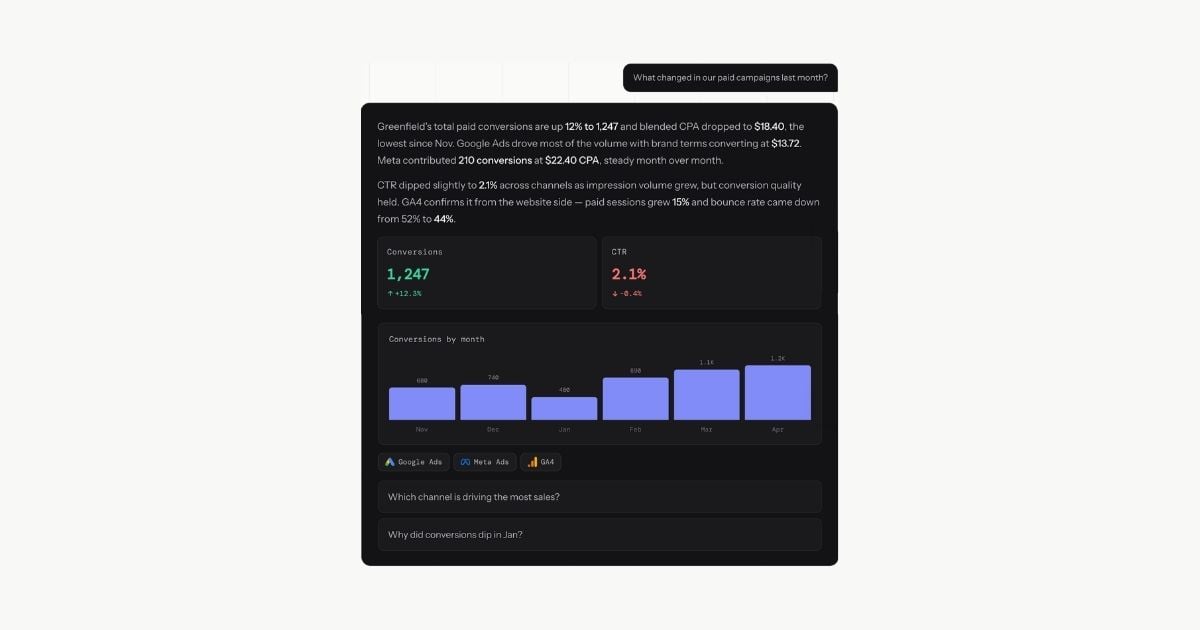
CPA is $43 this week, up from $33 last week—above the normal $18–$25 range and the highest in three months. The increase is driven by a 40% drop in Brand Search conversion rate after the Tuesday campaign pause, while Discovery spend continued unchanged. Recommend reactivating Brand Search or reallocating Discovery budget until conversion rates recover.
src="/blog-images/chatgpt-marketing-analytics.jpg" alt="LDOO answer with baseline context, causal investigation, and actionable recommendation compared to a generic ChatGPT summary" caption="LDOO knows what $43 means for this client because it maintains 90-day baselines, investigates across dimensions, and grounds the recommendation in the data." /> The difference is not writing quality. ChatGPT writes well. The difference is that LDOO knows what $43 means for this client, found the actual cause by investigating across dimensions, and grounded the recommendation in the data. Even if ChatGPT connects to marketing APIs tomorrow—and it will get better at data connections over time—the gap is not the answer. The gap is everything that happens after it. Branded reports. Ask a question, get the answer, click "Doo a report"—branded PDF with your agency's logo, colours, and formatting in under 60 seconds. No reformatting, no copying into slides, no separate reporting tool. Live client portals. Publish an answer as a branded, live client portal your client can check any time. No login required on their end. The data stays current because the portal is connected to the source. Scheduled delivery. Set a report to regenerate and email to the client weekly or monthly. The narrative updates automatically because it is generated from live data each time. No manual assembly. Cross-client analysis. Ask "which of my clients had the biggest CPA increase this week?" and get the answer across all 15 accounts in one response. ChatGPT cannot do this—it analyses one uploaded file at a time. Proactive alerts. LDOO detects anomalies after each sync and surfaces them before you ask. A conversion drop, a budget spike, a sudden change in traffic source—flagged automatically, not discovered during monthly reporting. These are not AI features. They are platform infrastructure built around the answer. ChatGPT getting smarter does not create a reporting workflow, a portal system, or a cross-client analytics layer. Those require a purpose-built platform, not a better chatbot. One agency managing 14 clients across Google Ads, GA4, and Meta previously spent 18 hours per month on reporting—exporting data, building slides, writing narrative. After switching their analytics workflow to LDOO, that dropped to 20-60 minutes. The time saved went directly into campaign strategy and client communication. The pattern is consistent: the first question takes under a minute. The first report takes under two. By the end of the first week, the team stops exporting CSVs entirely. ChatGPT and LDOO are complementary. They solve different problems. Use ChatGPT for writing polish, brainstorming campaign angles, building templates, drafting client emails—tasks where the AI does not need to be connected to live data and where hallucination is not dangerous. Use LDOO for the answers that go in front of clients. The ones that need to be accurate, contextualised against what is normal for this account, and ready to send without manual verification. The reports, the portals, the weekly briefings. Many agencies use both. ChatGPT makes their writing faster. LDOO makes their analytics faster. Different bottlenecks, different tools. Fifteen clients. Monthly reporting. 20-60 minutes per client to export data, build the narrative, format the deliverable. That is 5-15 hours per month. ChatGPT saves time on the writing—but you still export, upload, verify, and reformat. Call it 30% faster. LDOO eliminates the cycle. Question, answer, report—under two minutes per client. Fifteen clients: 30 minutes. That is 95% faster, not 30%. The difference is not ChatGPT being worse at AI. It is that LDOO is connected to the data, has the context, and was built for exactly this job. For the full feature-by-feature breakdown—pricing, privacy, side-by-side comparison table, and FAQ—see the ChatGPT vs LDOO comparison. For how the pipeline works under the hood, see how conversational analytics works. Not as a persistent, live connection. ChatGPT can analyse files you upload and work with some integrations, but it does not maintain dedicated OAuth connections to your marketing platforms. Every analysis requires a fresh export. LDOO connects directly to all major marketing APIs with one-click OAuth—your data is always live and queryable. For directional summaries and internal checks, yes. For numbers going in front of a client, the risk is that ChatGPT fills gaps with plausible-sounding data that cannot be verified without going back to the source. LDOO shows the underlying query behind every answer so the interpretation is verifiable. It depends on the bottleneck. If the bottleneck is writing speed, ChatGPT is already good. If the bottleneck is the export-upload-verify cycle and the time between question and client-ready deliverable, a connected conversational analytics platform like LDOO eliminates that workflow entirely. Yes. Many agencies do. LDOO handles connected analytics—live answers, branded reports, client portals, alerts. ChatGPT handles writing, ideation, templates, and general AI assistance. Different tools, different problems. ChatGPT's memory feature retains preferences and instructions across conversations, but it does not store your client's metric history, baselines, or campaign performance data. LDOO maintains 90-day statistical baselines per client and accumulates context from conversations, corrections, and reports over time.Beyond the answer
What agencies report after switching
Using both
The math
Frequently asked questions
Can ChatGPT connect to Google Ads, GA4, or Meta Ads?
Is ChatGPT accurate enough for client reporting?
What is the best ChatGPT alternative for marketing agencies?
Can I use ChatGPT and LDOO together?
Does ChatGPT remember my client data between sessions?